



Mandatory gratuity, often called automatic gratuity or a service charge, is a set percentage added automatically to a customer’s bill. It is commonly used for large parties, catering, or events where consistent staff compensation is important. Unlike voluntary tips, mandatory gratuity follows predefined rules set by the business and is applied by the POS system.
In this guide, you will learn exactly how mandatory gratuity works, how it differs from tips, and how to set it up and support it using Ehopper POS system.
What Mandatory Gratuity Is and Why It Matters
Mandatory gratuity is a required service charge, usually calculated as a percentage of the check total. Many restaurants use rates between 15 and 20 percent for large groups. Because it is automatic, it removes uncertainty for staff and creates predictable service income.
Restaurants choose mandatory gratuity to ensure stable earnings for servers, reduce awkward tip conversations with guests, and improve financial reporting. Since service charges are tracked separately in the POS, owners gain better visibility into labor-related revenue and costs.
Mandatory Gratuity vs Tips
It is important to understand the difference between mandatory gratuity and tips. Mandatory gratuity is defined and applied by the business, added automatically to qualifying checks, and typically treated as business income. It is usually paid out through payroll and taxed accordingly.
Tips, on the other hand, are voluntary. Customers decide whether to leave them and how much. Tips generally belong directly to the employee and are not automatically added by the POS unless prompted.
Because mandatory gratuity is not the same as a tip, it must be clearly disclosed to customers on menus, signage, or receipts.
Before you set it up, decide your policy
Step 1: Choose when it applies. Common rules include parties of 6+ or 8+, catering orders, banquet checks, or private events.
Step 2: Choose the amount. Many restaurants use 18% or 20% for large parties.
Step 3: Decide how to describe it. Use clear language like “18% Gratuity for Parties of 6+” so guests understand what it is.
Step 4: Decide how your team gets paid. Document whether it is paid out to servers, pooled, or split, and how it runs through payroll.
Step 5: Decide how you will disclose it. Put it on menus, reservation confirmations, event contracts, signage, and receipts.
How to set up mandatory gratuity in eHopper POS
Step 1: Log in to your eHopper Back Office.
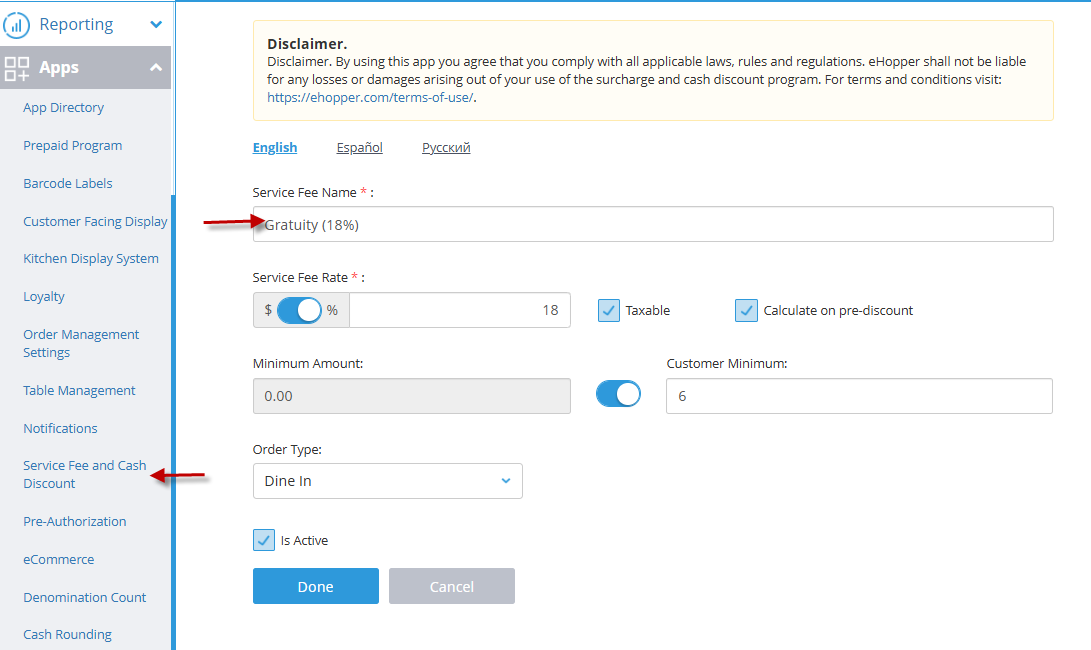
Step 2: Open the Service Charges (or Service Fees) settings area.
Step 3: Create a new service charge and name it clearly, for example “18% Gratuity for Parties of 6+”.
Step 4: Set the charge type to Percentage and enter your rate, for example 18.
Step 5: Set the rule for when it applies, for example based on customer count (party size) so it triggers automatically when the check meets your threshold.
Step 6: Configure how it calculates in relation to discounts. Decide whether the gratuity should be based on the pre-discount or post-discount amount, depending on your policy.
Step 7: Configure any tax behavior needed for your location. Tax handling can vary by jurisdiction, so confirm the correct setup for your state and city.
Step 8: Save and enable the service charge, then sync or push updates to registers if your setup requires it.
eHopper POS back office gratuity setup screen showing gratuity fee settings

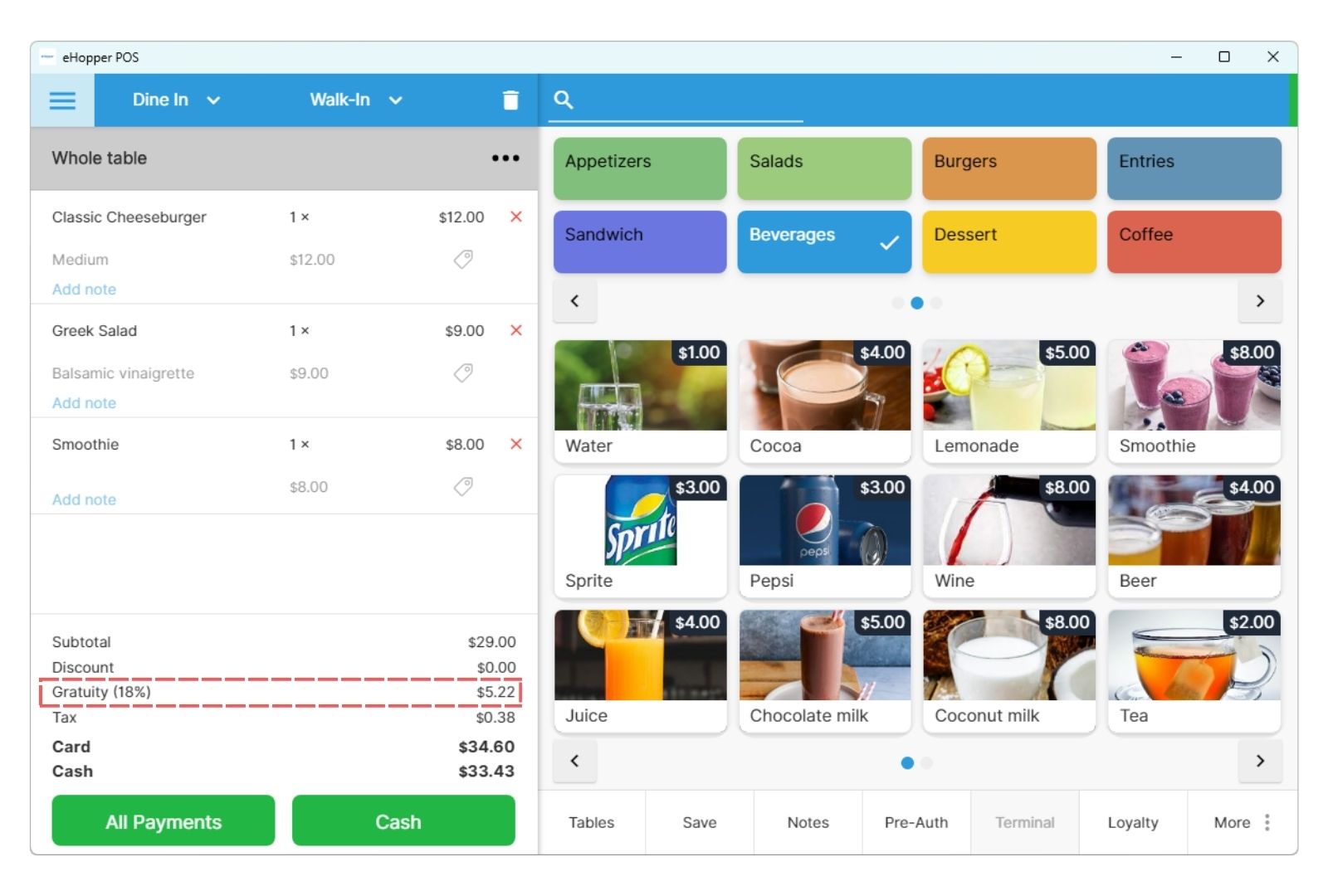
eHopper POS register screen showing applied gratuity fee on a customer order

How to support mandatory gratuity after setup
Train staff with a simple script: “Just a heads up, for parties of 6 or more we add an 18% gratuity automatically. You will see it listed on the receipt as a service charge.”
Make disclosure visible: Put the policy on menus, online ordering pages, catering contracts, and reservation confirmations. Clear disclosure reduces disputes.
Check the receipt: Run a test order that meets your rule and confirm the service charge appears correctly and the total matches expectations.
Review reports weekly: Track service charges separately from tips so payroll and accounting stay clean.
Keep a manager override process: Decide who can remove or adjust the charge, when it is allowed, and how to document it.
Common mistakes to avoid
Forgetting disclosure: Surprising guests at checkout leads to chargebacks, complaints, and refunds.
Mixing tips and service charges: If your POS and payroll treat them differently, keep the categories clean.
No written policy: Write down when it applies, the percent, and how payouts work. Consistency protects you and your staff.
Not testing edge cases: Test split checks, discounts, voids, refunds, and reopens to make sure the charge behaves as expected.
FAQ: Mandatory gratuity in eHopper POS, local and practical
How do I set up automatic gratuity for parties of 6+ in eHopper POS?
Create a service charge in eHopper Back Office, set it as a percentage (for example 18%), and configure the rule to apply automatically when the customer count meets your threshold, such as parties of 6 or more.
Is mandatory gratuity legal in my city or state?
In most places, it is allowed if it is disclosed clearly before purchase. Requirements can vary by state and city. Confirm local rules and disclosure requirements with your accountant or a local labor and tax professional.
Should mandatory gratuity be taxed?
Tax treatment can vary by jurisdiction. Some areas treat service charges differently than tips for sales tax and payroll tax purposes. Confirm the correct handling with your accountant, then configure eHopper accordingly.
How do I word mandatory gratuity on menus and receipts?
Keep it direct and specific. Example: “An 18% gratuity is automatically added to parties of 6 or more.” Use the same wording on menus, reservation confirmations, event contracts, and receipts.
Can guests still leave an extra tip if automatic gratuity is applied?
Yes, many restaurants allow additional tipping on top of the service charge. Decide your policy and train staff to explain it clearly.
How do I handle mandatory gratuity for catering and private events?
Create a dedicated service charge for catering or events, apply it to event checks, and disclose it in your catering contract and invoice. If you want different rates for dine-in versus events, use separate service charges so reporting stays clean.
What is the best automatic gratuity percent for restaurants?
Many restaurants use 18% or 20% for large parties. The best rate depends on local expectations and your labor model. If your area is price sensitive, start with 18% for large parties and review guest feedback for 30 to 60 days.
Can I change or disable mandatory gratuity later in eHopper POS?
Yes. You can adjust the percentage, change the triggering rules, or disable the service charge in eHopper Back Office as your business needs evolve.
Can I use eHopper POS service fees for charges other than gratuity?
Yes. In eHopper POS, service fees are flexible and not limited to gratuity only. You can create and apply other service fees such as delivery fees, packaging fees, convenience fees, or custom service charges based on your business needs.
Each service fee can have its own name, percentage or flat rate, order type, and activation rules. This allows you to use the same service fee feature for dine-in gratuity, delivery fees, catering fees, or other operational charges while keeping reporting clear and organized. Here is a good post on how to use service charges to automate you business.
Get help setting it up in eHopper
If you want a clean, setup with correct rules, receipts, and reporting, we can help you configure mandatory gratuity in eHopper POS based on your exact workflow, dine-in, catering, events, or all three.
See how eHopper service charges work live and how it looks on the receipt.
We can help you define the policy, configure rules, test edge cases, and confirm reporting for payroll.
Book a demo or request help setting up mandatory gratuity today. Replace this sentence with your booking link or contact form link.
Disclaimer: This article is for informational purposes only and does not constitute legal, tax, or accounting advice. Laws and regulations related to service charges, gratuity, payroll, and taxation vary by state and locality. You are responsible for ensuring compliance with all applicable laws, rules, and regulations when using mandatory gratuity or other service fees. Consult with your accountant, payroll provider, or legal advisor before implementing or changing gratuity policies in your business.