
How U.S. Merchants Can Support Penny Cessation Using eHopper POS
The penny is going away, and some U.S. businesses are not ready for it. As pennies become harder to use, merchants who rely on manual calculations or outdated POS systems may face checkout errors, customer disputes, longer lines, and reporting inconsistencies.
Cash rounding is not optional when exact change is no longer available. Without the right tools, businesses risk handling it incorrectly. The good news is that modern POS systems can automate this process and remove the burden from staff.
Overview
The penny has been part of U.S. commerce for generations, but its role is coming to an end. It now costs more to make a penny than it is worth, and fewer customers use cash. As a result, the United States has stopped producing new pennies.
Pennies remain legal tender, but over time they will naturally disappear from everyday transactions. This shift does not mean prices are increasing. It means businesses must handle cash transactions differently, using clear and consistent cash rounding.
Why the Penny Is Being Phased Out in the U.S.
According to the US Department of Treasury, the decision to stop producing pennies is based on cost and practicality.
- It costs about 3.69 cents to produce one penny
- Ten years ago, production cost was around 1.3 cents
- Ending production is expected to save roughly 56 million dollars per year
- Cash usage continues to decline nationwide
With such low purchasing power and high production costs, continuing to mint pennies no longer makes financial sense.
When Penny Production Stopped
The U.S. Mint has stopped manufacturing new pennies on November 12, 2025. However, there are still approximately 114 billion pennies already in circulation.
- Pennies are still legal tender
- Businesses should continue accepting pennies while they circulate
- There is no fixed end date for when pennies disappear
- Non-cash payments continue to process to the exact cent
How Cash Rounding Works for Merchants
Cash rounding applies only to cash payments. After all items, fees, and sales taxes are calculated, the final total is rounded to a set denomination, most commonly five cents.
A widely accepted approach is symmetrical rounding.
- Totals ending in 1, 2, 6, or 7 round down
- Totals ending in 3, 4, 8, or 9 round up
- Totals ending in 0 or 5 remain the same
Over time, rounding up and down balances out, meaning there is no overall increase in consumer prices.
Why the Right POS Tools Matter During Penny Cessation
Many businesses without modern POS systems will struggle during the penny transition. Manual rounding decisions at checkout are error-prone and inconsistent, especially during busy hours.
Common issues include rounding before tax, rounding differently between employees, forgetting to disclose adjustments, and mismatched reports at the end of the day. These problems can lead to customer complaints and accounting issues.
Using an automated POS solution eliminates these risks by applying the same rounding rules to every cash transaction, every time.
How eHopper POS Supports Penny Phase-Out in the U.S.
Cash rounding is not new. Canadian merchants eliminated the penny years ago and adopted a symmetrical rounding approach. That experience showed that removing the penny does not increase prices when rounding is applied fairly and consistently.
eHopper originally supported Canadian merchants using this methodology. U.S. merchants can now adopt the same proven approach with minimal operational changes and a familiar customer experience.
eHopper POS includes a built-in Cash Rounding app that automatically handles cash rounding for sales, refunds, and exchanges. Once configured, the system applies the same rules every time, removing guesswork and reducing human error.
Step 1. Enable the Cash Rounding App
Merchants can install the Cash Rounding app from the App Directory. Only Administrator roles can configure rounding settings.
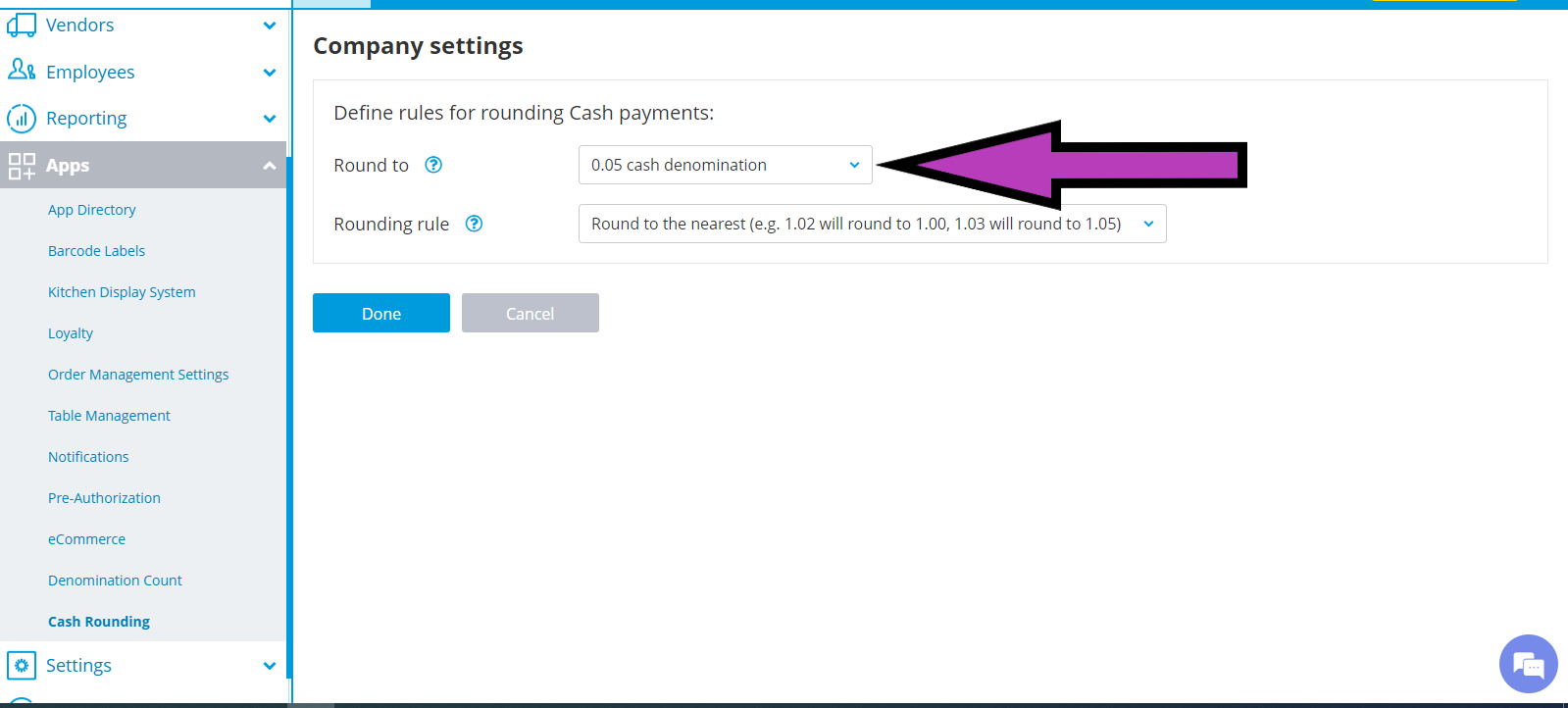
Step 2. Choose a Rounding Denomination
Ehopper POS support various cash denominations, such as 0.05c, 0.10c, 0.15c, o.20c.
- Select 0.05c
Step 3. Select a Rounding Rule
- Round to nearest
Step 4. Automatic Rounding at Checkout
During a cash transaction, eHopper POS calculates the rounded total, displays the adjustment on screen, and prints it on the receipt. If a transaction includes both cash and card, only the cash portion is rounded.
Step 5. Reporting and Accounting Visibility
- Rounding amounts appear on order details
- Z and X reports show rounding as a separate line
- QuickBooks sync records rounding as a service line item
Frequently Asked Questions
Does cash rounding apply to card payments?
No. Cash rounding applies only to cash transactions. Card, check, gift card, and digital payments continue to process to the exact cent.
Will customers pay more because of rounding?
No. With symmetrical rounding, totals are rounded up and down evenly over time, resulting in no overall price increase.
When should rounding be applied?
Rounding should be applied only after all items, fees, and sales taxes are calculated.
Is eHopper POS ready for penny cessation?
Yes. eHopper POS already includes a Cash Rounding app designed to support penny phase-out scenarios automatically and consistently.
Final Notes for Merchants
Important: Cash rounding is a practical response to penny cessation, not a surcharge and not a price increase. It should be applied consistently, transparently, and only to cash payments.
This article is provided for educational information only. Laws, tax rules, and disclosure requirements may vary by state and locality. Merchants should always consult their tax and legal advisors before implementing or changing cash rounding practices.