
Top 11 Restaurant POS Features Every Restaurant Should Consider
A restaurant point of sale system has become much more than a tool for accepting payments. For today’s restaurants, the POS can serve as the center of daily operations, connecting orders, payments, tables, employees, inventory, the kitchen, online ordering, delivery services, loyalty, and reporting.
The right restaurant POS features can help a business process orders faster, reduce mistakes, understand sales performance, manage employees, and create a better experience for customers. This is important whether you operate a quick-service restaurant, coffee shop, bar, food truck, pizzeria, or full-service restaurant.
When comparing restaurant POS systems, it is important to look beyond the basic checkout screen. Restaurant owners should consider how well the system handles the complete flow of an order, from the moment a customer places it until the food is prepared, payment is completed, inventory is updated, and the transaction appears in the restaurant’s reports.
Here are 11 restaurant point of sale system features to consider when selecting a POS for your restaurant.
1. Flexible Restaurant Payment Processing
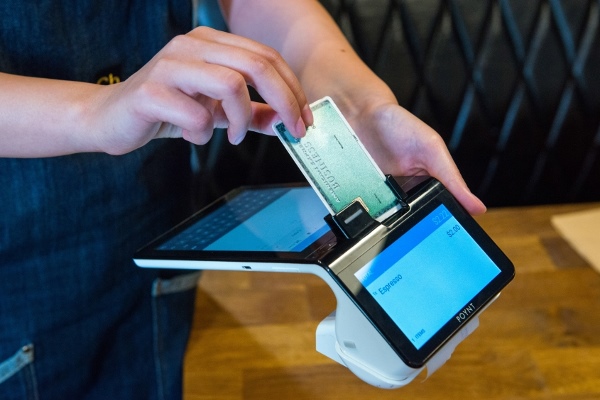
Fast and flexible payment processing is one of the most important restaurant POS features. Customers expect to pay using the method that is most convenient for them, while restaurants need to move people through checkout without creating unnecessary delays.
A restaurant POS should support traditional payment methods such as cash, credit cards, and debit cards, as well as contactless options including Apple Pay, Google Pay, and Samsung Pay.
For restaurants where customers keep a tab open, pre-authorization can also simplify service. A restaurant can pre-authorize a customer’s card and allow additional items to be added to the order without requiring the card to be presented again every time.
Tip and gratuity management is another important part of restaurant payments. Employees can collect tips on the POS screen, payment terminal, or receipt, while restaurant management can track tip amounts and properly distribute them among employees based on the restaurant’s policies.

2. Floor Plan and Table Management
For full-service restaurants, table management can be just as important as payment processing.
A restaurant point of sale system with a visual floor plan allows the restaurant to recreate its dining room inside the POS. Managers and servers can organize service sections, tables, seating positions, and server assignments.
This gives employees a clearer view of restaurant activity. Servers can quickly determine which tables are available, which tables have active orders, and where customers are seated.
Better table organization can also help restaurants improve table turnover. Instead of relying on handwritten notes or disconnected systems, employees can manage tables and orders from one platform.
3. Online Ordering and Delivery App Integration
Restaurant customers increasingly expect to be able to order from wherever they are. That makes online ordering an important part of a modern restaurant POS system.
With an integrated online ordering system, customers can browse the restaurant’s menu and place an order online for pickup or delivery. The order can then sync with the restaurant’s on-site POS instead of requiring employees to manually enter it again.
Restaurants should also consider how the POS handles third-party delivery platforms. Integrations with services such as Uber Eats, DoorDash, and Grubhub can bring incoming delivery orders directly into the restaurant’s order workflow.
Bringing online and in-store orders together helps employees avoid switching between multiple tablets and manually re-entering orders. It can also reduce errors caused by entering the same order more than once.
4. Restaurant Inventory Management
Inventory is one of the largest operating concerns for many restaurants. Ingredients can be expensive, products can spoil, and shortages can interrupt service.
Restaurant inventory management connected to the POS gives owners better visibility into what they have in stock.
More advanced restaurant POS systems can track inventory down to the ingredient level. Instead of only knowing how many menu items were sold, the restaurant can understand how those sales affect ingredients used to prepare them.
For example, selling multiple pizzas affects quantities of dough, cheese, sauce, and other ingredients. Having that information available can help a restaurant identify when inventory needs to be replenished and reduce the chance of discovering a shortage during a busy shift.
Better inventory visibility can also help management understand purchasing patterns and identify potential waste.
5. Self-Service Kiosks
Self-service kiosks can be particularly useful for quick-service restaurants and other businesses where customers order directly from a menu.
Instead of waiting for an employee to take an order, customers can browse available items, customize their selection, place the order, and complete checkout through the kiosk.
This can reduce lines during busy periods and allow restaurant employees to focus on food preparation, customer assistance, and other tasks.
Kiosks can also give customers more time to explore a menu without feeling pressured by people waiting behind them. Restaurants can present modifiers, add-ons, upgrades, and other options directly on the ordering screen.
When the kiosk is connected to the restaurant POS, kiosk orders become part of the same restaurant ordering environment rather than operating as a separate system.
6. Kitchen Display System and Directional Kitchen Printing
Taking an order quickly does not help if the kitchen does not receive the order correctly.
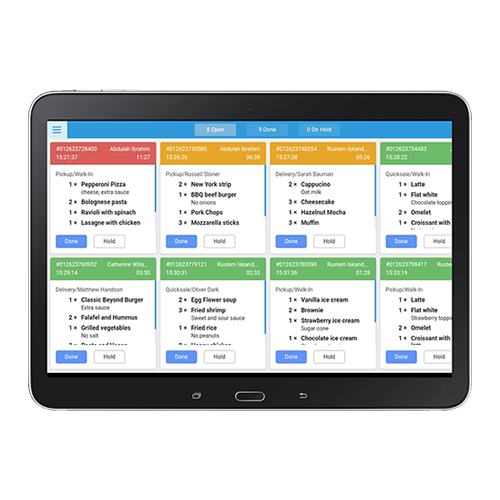
A Kitchen Display System, commonly called a KDS, digitally sends orders to the kitchen and gives kitchen staff a clear view of what needs to be prepared.
A KDS can help reduce dependency on paper tickets and improve communication between front-of-house and kitchen employees. Orders can move from the POS to the kitchen without staff having to verbally communicate every item.
Restaurants that prefer printed tickets should also look for directional kitchen printing.
Directional printing allows specific menu items to be routed to different printers. For example, pizza items can be sent to the pizza station, grilled items to the grill printer, and beverage orders to the bar.
This helps each preparation area receive the information it needs without printing unnecessary items at every kitchen station.
7. Mobile POS and Order at the Table
Servers should not always have to walk back to a fixed POS terminal to enter an order.
A mobile restaurant POS allows employees to take orders directly at the table using supported mobile POS hardware such as an Android tablet or payment terminal.
Once the customer provides the order, the server can enter it immediately instead of writing it down and entering it later at another station.
This can reduce unnecessary walking, shorten the time between ordering and food preparation, and decrease errors caused by handwritten orders.
Mobile ordering can also help servers manage more tables efficiently because they can access the POS while moving throughout the restaurant floor.
8. Menu Builder and Digital Menu Management
A restaurant’s menu changes over time. Prices change, new products are introduced, seasonal items appear, and categories need to be reorganized.
A built-in Menu Builder gives restaurants the ability to organize and customize categories and menu items inside the restaurant POS product catalog.
Restaurants can create a menu structure that makes sense for employees and customers while keeping products properly organized.
Digital signage can extend the menu beyond the POS screen. Restaurants can display menu items, pricing, customer messages, promotions, and other information on larger screens throughout the location.
Small usability features can also make a difference. For example, a dark POS screen can reduce glare in restaurants with darker lighting and may make the POS more comfortable for employees to use during evening service.
9. Customer Profiles and Loyalty Programs
A restaurant POS can also help turn one-time customers into repeat customers.
Customer management features allow restaurants to maintain customer profiles and contact information. Depending on how the restaurant operates, this information can help employees provide more personalized service and understand their customer base.
An integrated loyalty program takes this a step further. Restaurants can create loyalty rules that allow customers to earn points and redeem rewards based on purchases.
Instead of managing loyalty through an unrelated platform, connecting the loyalty program with the POS allows customer activity and purchases to work together.
For restaurants competing for repeat business, loyalty can be especially valuable. Getting an existing customer to return can be just as important as attracting someone new.
10. Employee Management
A restaurant POS is used by many different employees, so employee management and accountability should be built into the system.
Restaurants can use the POS to track daily time clocks, employee actions, and tips. Managers can see when employees clock in and out and have better visibility into activity taking place on the POS.
Employee permissions are also important for security. Not every employee should necessarily have access to every POS function.
For example, a restaurant may allow servers to create orders and accept payments while restricting certain administrative functions to managers. Permissions can help control access to sensitive operations and reduce unauthorized changes.
Combining employee activity, time tracking, and permissions inside the POS gives restaurant management one place to oversee many common staff activities.
11. Restaurant Reporting and Business Insights
A restaurant generates valuable information with every transaction. A good POS should turn that information into reports that restaurant owners can actually use.
Restaurant POS reporting can provide insight into sales, transactions, inventory, customers, and employee activity.
Instead of simply knowing the total amount sold at the end of the day, restaurant owners should be able to look deeper into their business. Which products are selling? When are the busiest periods? How are employees performing? What is happening with inventory? Which transactions require attention?
Having this information available in one reporting system can help restaurant owners make decisions based on actual business activity rather than assumptions.
Over time, reporting can help identify trends, evaluate menu performance, monitor operations, and understand where opportunities or problems may exist.
What Should You Look for in a Restaurant POS System?
Not every restaurant needs exactly the same technology. A small coffee shop may prioritize fast checkout, loyalty, and online ordering, while a full-service restaurant may care more about table management, mobile ordering, tipping, and kitchen communication.
The important thing is to choose a restaurant point of sale system that can support the way your restaurant operates today while giving you room to add new capabilities as the business changes.
Rather than purchasing separate systems for payments, online ordering, delivery orders, inventory, loyalty, employee management, and reporting, restaurants can benefit from having these functions connected through one platform.
Bringing Restaurant Operations Together with eHopper POS
eHopper POS brings many of these restaurant POS features together in one system designed to support different types of restaurant operations.
Restaurants can manage payments, tables, online orders, inventory, delivery orders, self-service kiosks, kitchen operations, mobile ordering, customers, employees, loyalty, digital signage, menus, and reporting from a connected restaurant technology platform.
The goal of a modern restaurant POS is not simply to replace a cash register. It should help connect the different parts of the restaurant so employees can work more efficiently and owners have better visibility into their business.
When evaluating your next restaurant POS system, look at the complete customer and employee experience. Consider what happens when an order is placed, how it reaches the kitchen, how payment is processed, how inventory changes, how employees interact with the system, and what information is available to management afterward.
Choosing the right combination of restaurant POS features can help create a faster, more organized operation while giving your restaurant the technology needed to serve customers in-store, online, and wherever they choose to order.
See If eHopper Is the Right POS for Your Restaurant
Your restaurant POS should help you serve guests faster, keep orders moving, reduce mistakes, and give you better control over your day-to-day operations.
If you are looking for a POS that brings payments, online ordering, table management, kitchen operations, inventory, loyalty, employee management, and reporting together, eHopper may be a good fit for your restaurant.
Test drive eHopper POS for free today and see how it can help your restaurant take orders faster, improve service, and keep front-of-house and back-of-house operations connected.